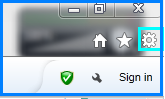
In order to protect the security of the Internet, Microsoft Internet Explorer provides a filtering function. Sometimes, innocent Web pages get caught up in the filters by Internet Explorer, and you need to mark them as "safe" before you can visit them or allow them to add cookies to your computer. Here I teach you how to add site to safe list. Solution
- Open the Internet Explorer, click Tools --> Internet Options.